


Have you ever walked into a project meeting expecting clarity but walked out with even more confusion? You are not alone. Many teams spend hours in meetings that end without decisions or clear next steps. The truth is, project meetings can either push work forward or hold it back.
Running an effective project meeting is not rocket science. It is about preparation, structure, and follow-up. With the right approach, meetings can boost collaboration, uncover risks, and keep projects on track. Without it, they turn into time-consuming chatter.
In this guide, we will explore how to facilitate productive project meetings. You will learn definitions, objectives, preparation steps, roles, best practices, challenges, and modern trends. Along the way, we will connect to essential resources like agenda writing and meeting minutes so you can build a complete picture.
What is a Project Meeting?
A project meeting is a gathering of team members and stakeholders to discuss project progress, address issues, and plan next steps. Unlike general staff meetings, project meetings are focused on specific deliverables and timelines.
For example, a marketing team may meet weekly to check campaign progress, while a construction project team may meet daily to review tasks on-site. The key is that project meetings revolve around goals, milestones, and collaboration.
If you have already explored the types of company meetings, you will recognize that project meetings are functional. They help coordinate efforts, solve problems, and keep everyone aligned.
Objectives of an Effective Project Meeting
Why do we even hold project meetings? The objectives are simple yet powerful:
- Review Progress
Teams check if tasks are on schedule and whether milestones are being met. - Address Risks and Blockers
Problems are raised early so they can be resolved quickly. - Align Responsibilities
Everyone knows who is doing what, reducing overlaps and confusion. - Make Decisions
Meetings are used to approve changes, assign new tasks, or adjust deadlines.
In short, the main purpose is to keep the project moving forward.
Pre-Meeting Preparation
Good meetings begin long before people sit down at the table or log in online. Preparation saves time and ensures productivity.
1. Create and Circulate an Agenda
A project meeting without an agenda is like a ship without a compass. A well-structured agenda ensures focus. It should list topics, assign time slots, and clarify objectives.
2. Share Relevant Documents
Send reports, charts, or proposals in advance. This prevents wasting time reading during the meeting.
3. Confirm Participants
Invite only those directly involved in the project or decision-making. Too many participants create chaos.
4. Test Technology
For hybrid or online sessions, check internet connections, microphones, and screens. Following virtual meetings best practices avoids last-minute disruptions.
5. Time Management
Set a clear start and end time. Long meetings kill energy and focus.
Preparation may sound boring, but it is the secret ingredient to productive discussions.
Key Roles in a Project Meeting
Every participant matters, but some roles are particularly important.
- Project Manager (Facilitator): Leads the meeting, keeps discussions on track, and ensures decisions are made.
- Team Members (Contributors): Share updates, raise issues, and take ownership of tasks.
- Company Secretary or Scribe: Records notes and prepares minutes of meeting.
- Stakeholders or Clients: Join when input or approval is required.
These roles mirror the broader participants’ responsibilities in meetings. Without clarity, discussions drift.
How to Facilitate an Effective Project Meeting Step by Step
Step 1: Open with Clear Goals
The facilitator should start by stating the purpose. For example, “Today we will review sprint progress and finalize next week’s tasks.”
Step 2: Review Previous Minutes
Quickly confirm the action items from the last meeting. This provides continuity.
Step 3: Follow the Agenda
Stick to the order of topics. Avoid going off on unrelated tangents.
Step 4: Encourage Participation
Invite input from everyone, not just the most vocal members.
Step 5: Assign Responsibilities
Every decision should have an owner and a deadline.
Step 6: Record Decisions
The secretary must write down key points, actions, and timelines.
Step 7: Close with a Recap
Summarize outcomes and confirm the next meeting date.
Following this process ensures efficiency and accountability.
Best Practices for Running Project Meetings
Here are some teacher-approved tips for making your meetings effective:
- Time-Box Discussions: Allocate time and stick to it.
- Use Visual Aids: Dashboards or slides help everyone stay on the same page.
- Promote Accountability: Ask for updates in a way that encourages responsibility without blame.
- Apply Clear Communication: Following the 7 Cs of communication keeps discussions simple and effective.
- End with Actions: Never leave without a list of assigned tasks.
Above all, keep meetings focused on outcomes rather than endless debates.
Common Challenges in Project Meetings
Even well-planned meetings face hurdles. Let us explore the common ones.
- Off-Topic Discussions
People love to wander into unrelated conversations. - Unprepared Participants
Some attend without reading the shared documents. - Dominant Voices
A few participants may overshadow quieter members. - Meeting Fatigue
Too many meetings can frustrate team members.
These issues often reflect a failure to apply the essentials of a valid meeting, such as proper notice and structure.
Solutions to Overcome Challenges
- Stick to the Agenda: Politely redirect when discussions go off-track.
- Encourage Pre-Reading: Remind participants to review materials before the meeting.
- Balance Participation: The facilitator should ensure everyone contributes.
- Reduce Meeting Frequency: Not every issue requires a meeting. Use emails or project tools instead.
With these solutions, even stubborn challenges can be handled smoothly.
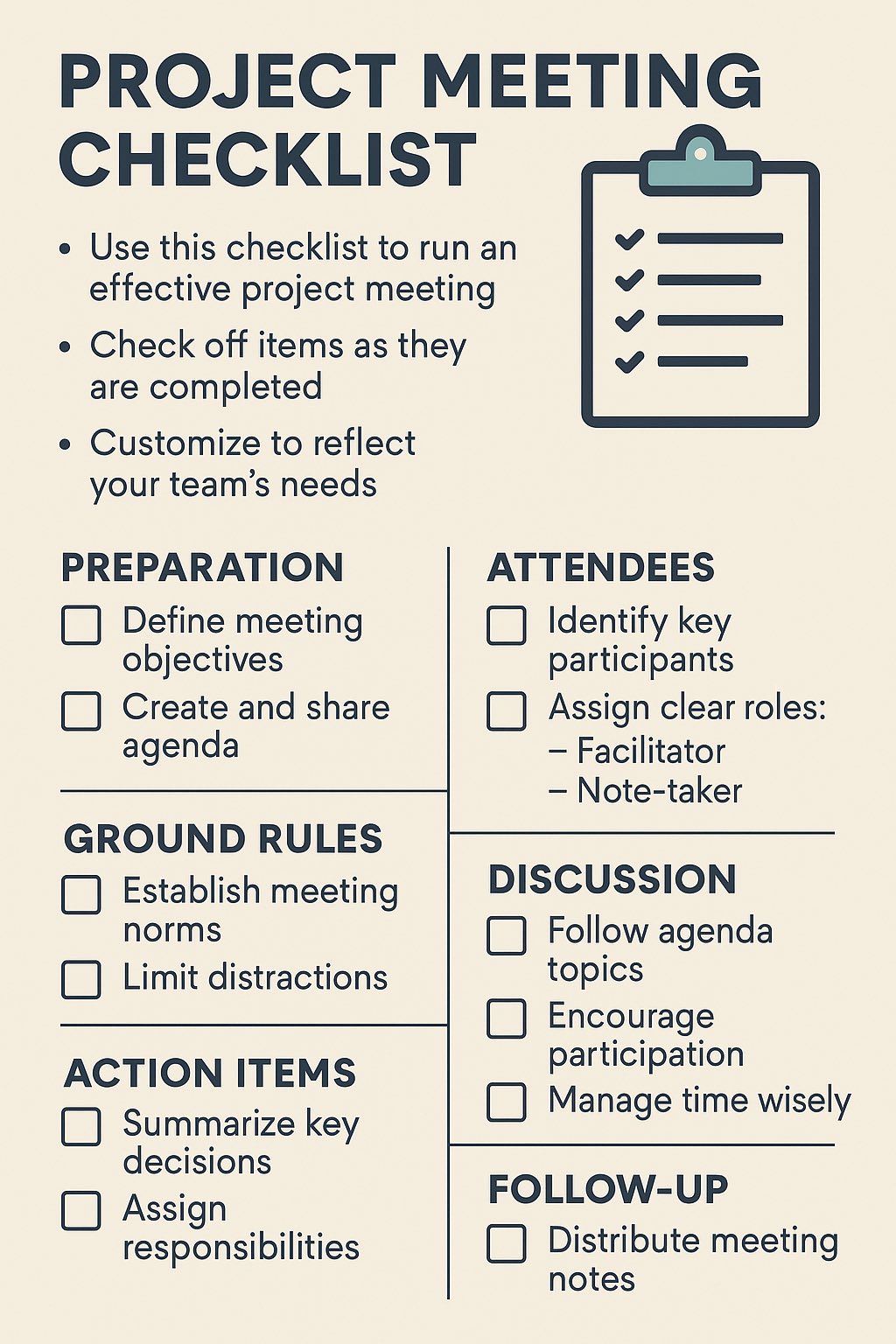
Checklist for Productive Project Meetings
Here is a practical checklist you can use:
- Agenda prepared and shared.
- Reports circulated in advance.
- Participants confirmed.
- Technology tested.
- Minutes from previous meeting reviewed.
- Discussions focused on agenda.
- Action items assigned with deadlines.
- Decisions recorded.
- Meeting closed with a recap.
This checklist ensures no key step is missed.
Role of Technology in Project Meetings
Technology is a game-changer for effective project meetings.
- Project Management Tools: Trello, Asana, or Jira keep tasks organized.
- Communication Apps: Slack or Microsoft Teams integrate with meetings for real-time updates.
- Digital Minutes: Tools can record and store minutes for future reference.
These tools make project meetings smarter and more transparent.
Modern Trends in Project Meetings
Meetings today are evolving. Let us explore some trends:
- Hybrid Meetings
Teams combine physical and remote attendance. - Asynchronous Updates
Instead of meeting daily, teams share updates in project management tools. - AI-Powered Tools
Artificial intelligence now helps create agendas, summarize discussions, and assign tasks. - Data Dashboards
Instead of long verbal updates, teams review project dashboards.
These trends are reshaping how we collaborate, much like the rise of virtual meetings did earlier.
Conclusion
Project meetings do not have to be long, boring, or unproductive. When facilitated well, they can be the heartbeat of a project, driving progress and ensuring accountability.
In this guide, we explored definitions, objectives, preparation steps, roles, facilitation process, best practices, challenges, solutions, checklists, and modern trends. The takeaway is clear: preparation and structure are the backbone of an effective project meeting.
If you want to dive deeper, explore related posts on notice of meetings, agenda writing, and minutes of meeting. These resources will make your project meetings not only productive but also professional.
So, the next time you sit in a project meeting, ask yourself: Are we just talking, or are we actually moving the project forward?
Frequently asked questions
What should I do if someone keeps derailing the meeting with off-topic comments?
Acknowledge their point briefly, then redirect: “That’s valuable, but let’s table it for a separate discussion. Right now we need to focus on [agenda item].” Use a parking lot document to capture off-topic ideas so people feel heard. Stay polite but firm about keeping time and focus.
How do I get quiet team members to speak up without putting them on the spot?
Invite input by name before the meeting starts: “Sarah, I’d like your perspective on the timeline.” Ask open questions instead of yes/no ones. Pause after questions to give people thinking time. Create a culture where all voices matter by acknowledging contributions equally.
Should I send meeting minutes before or after getting team approval?
Send a draft within 24 hours while details are fresh. Give the team 24-48 hours to review and correct errors. Then finalize and distribute the approved version. This catches mistakes early and ensures everyone agrees on decisions and action items.
What’s the best way to handle a meeting that’s running over time?
Announce the time limit five minutes before the end. Quickly prioritize remaining items: decide what gets decided today versus what needs a follow-up. Assign unfinished topics to a separate meeting. Respect people’s calendars—running over signals poor planning.
How many people should actually attend a project meeting?
Invite only those who need to contribute, decide, or be informed. A good rule: if someone can’t answer “Why am I here?” they shouldn’t attend. Too many voices slow decisions. Keep core team small, bring in stakeholders only when their input is needed.
What if a key decision-maker doesn’t show up to the meeting?
Don’t make decisions that require their approval. Document what was discussed and send them a summary with a deadline to respond. Schedule a brief follow-up call if the decision is urgent. Avoid re-meeting the whole team just to repeat information.