


Technology has reshaped how businesses exchange information, coordinate work, and make decisions. This article examines the specific ways technology transforms business communication, from speed and cost savings to security risks and adoption challenges, so you can make informed choices about communication tools and practices.
How technology transforms business communication
The most profound shift technology brings is the move from synchronous to asynchronous workflows. Twenty years ago, business conversations happened in real time: phone calls, in-person meetings, or at best, fax exchanges. Today, email, messaging platforms, and collaborative documents let teams contribute when it suits their schedule. A product manager in Manila can review a design spec at 9 AM local time, while the designer in London sees feedback when they start their day, no scheduling conflict required.
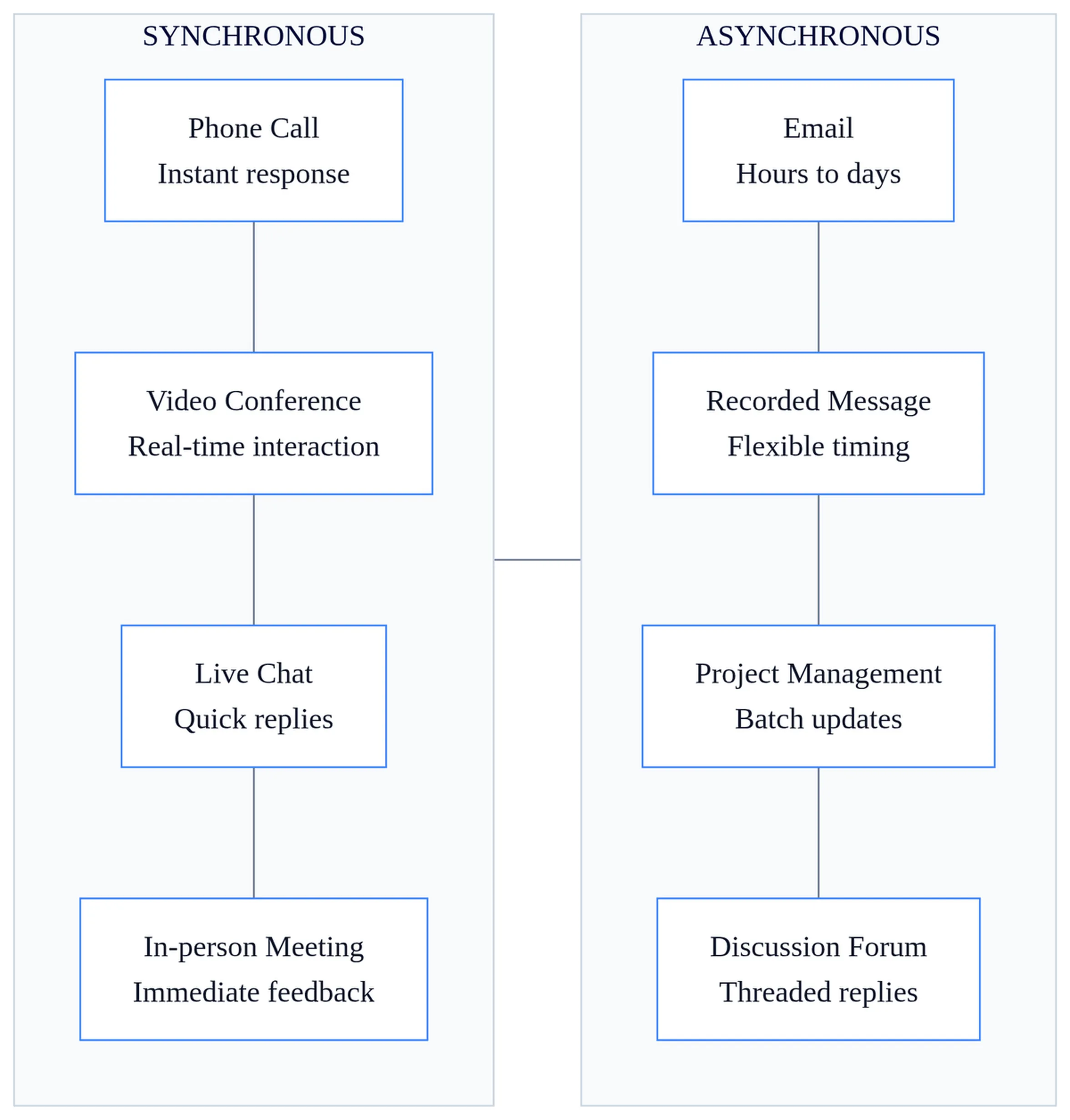
Geography no longer dictates who can participate in business conversations. A small Dhaka-based software agency can coordinate client feedback from Toronto, development work in Chittagong, and quality assurance in Sylhet without anyone boarding a plane. Time zones remain a constraint, but asynchronous tools turn them from blockers into minor scheduling considerations.
Technology also democratizes information access. Before centralized digital systems, knowledge lived in filing cabinets, individual inboxes, or specific people’s heads. Now, a new hire can search a shared drive or knowledge base and find the same procurement policy document the CFO references, no need to know who to ask or wait for someone to dig through files.
Real-time collaboration tools let multiple people edit the same document, spreadsheet, or presentation simultaneously. This eliminates the versioning chaos of emailing attachments back and forth, where “Final_v3_ACTUAL_USE_THIS.docx” becomes a running joke that masks real productivity loss.
Speed and efficiency gains in information sharing
The speed advantage of digital communication is obvious but still worth quantifying. A postal letter from New York to Singapore might take seven to ten days. An email arrives in seconds. For time-sensitive business decisions, approving a vendor contract before a deadline, confirming inventory levels during a stockout, or greenlighting an urgent PR response, this speed difference is the difference between capturing an opportunity and losing it.
Email and cloud storage platforms let you transmit files that would be physically impossible to mail. A 200-page technical specification document, a 50 MB presentation deck with embedded videos, or a folder containing hundreds of product images, all attach to an email or upload to a shared drive in minutes. Compare that to printing, binding, and shipping physical copies, which could cost hundreds of dollars and days of transit time.
Faster information access compresses decision-making cycles. A manager evaluating three supplier bids no longer waits for paper proposals to arrive by courier. Instead, she reviews digital submissions the moment they’re sent, cross-references pricing against last quarter’s data in the ERP system, and replies with questions, all within an hour. Research from IDC suggests that organizations using integrated communication platforms reduce meeting time by up to 25% because participants arrive already informed, having reviewed shared documents beforehand.
Speed creates its own trap, though. Instant access to information doesn’t guarantee better decisions, just faster ones. When a team rushes to decide based on incomplete data because the tools allow instant responses, speed becomes a liability. Most teams I’ve seen struggle more with premature decisions than with slow ones. The challenge is knowing when to slow down despite having the capability to move quickly.
Cost reduction through technology-enabled communication
Travel elimination delivers the most visible cost savings. A multinational with offices in Mumbai, London, and Chicago once flew executives across continents for quarterly reviews. Now, video conferencing and virtual meetings handle the same agenda for the cost of software licenses and bandwidth. For a company spending $15,000 per international trip (airfare, hotels, meals, lost productivity), replacing even four trips per year with video calls saves $60,000 annually.
Paper, printing, and physical storage costs shrink as communication goes digital. A mid-sized firm that previously printed 10,000 pages monthly at $0.05 per page, plus toner, maintenance, and filing supplies, saves $6,000 yearly by shifting to digital documents. Eliminating one four-drawer filing cabinet frees up six square feet of office space; at $40 per square foot annually in a typical commercial lease, that’s $240 saved per cabinet.
Telecommunications expenses dropped dramatically with VoIP and internet-based calling. Long-distance calls that once cost $0.50 per minute now run through platforms like Microsoft Teams or Zoom at effectively zero marginal cost. A sales team making 200 international calls monthly saves $6,000 annually compared to traditional phone charges.
Hybrid and remote work models enabled by communication technology reduce real estate costs. Companies that previously leased 20,000 square feet of office space can operate in 10,000 when half the workforce works remotely on rotating schedules. At $35 per square foot, that’s $350,000 in annual lease savings, enough to fund substantial technology investments while still netting significant cost reductions.
Managing global operations and remote teams
Coordinating geographically dispersed business units requires real-time visibility into operations. A logistics company with warehouses in Karachi, Dubai, and Rotterdam uses a centralized inventory management system that updates instantly when goods move. The Dubai warehouse manager sees Karachi’s stock levels before deciding whether to reroute a shipment, preventing costly overstocking or stockouts.
Time zone differences shift from obstacles to advantages when teams adopt asynchronous workflows. A design agency structures projects so the US-based strategy team hands off briefs at their end-of-day, the Manila design team works through them overnight (US time), and the US team wakes to completed mockups. This “follow-the-sun” model compresses project timelines by running work continuously across time zones.
Centralized information repositories give global teams access to the same knowledge base. When the Jakarta office closes a deal using a contract template, the São Paulo team can find and adapt that template without reinventing it. This consistency reduces errors and speeds onboarding for new markets. Understanding various internal communication methods helps teams choose the right tools for their specific coordination needs.
Virtual meeting platforms enable face-to-face interaction despite distance, preserving some of the relationship-building that text-based communication loses. However, these tools work best for specific scenarios: collaborative problem-solving, sensitive conversations, team bonding. Information broadcasts are better handled by email or recorded videos.
Security risks and privacy considerations
Digital communication channels expose businesses to data breach risks that physical mail never posed. An intercepted email containing customer payment information, a hacked messaging platform leaking strategic plans, or an unsecured video call recorded by an unauthorized participant, each represents a potential legal, financial, and reputational disaster.
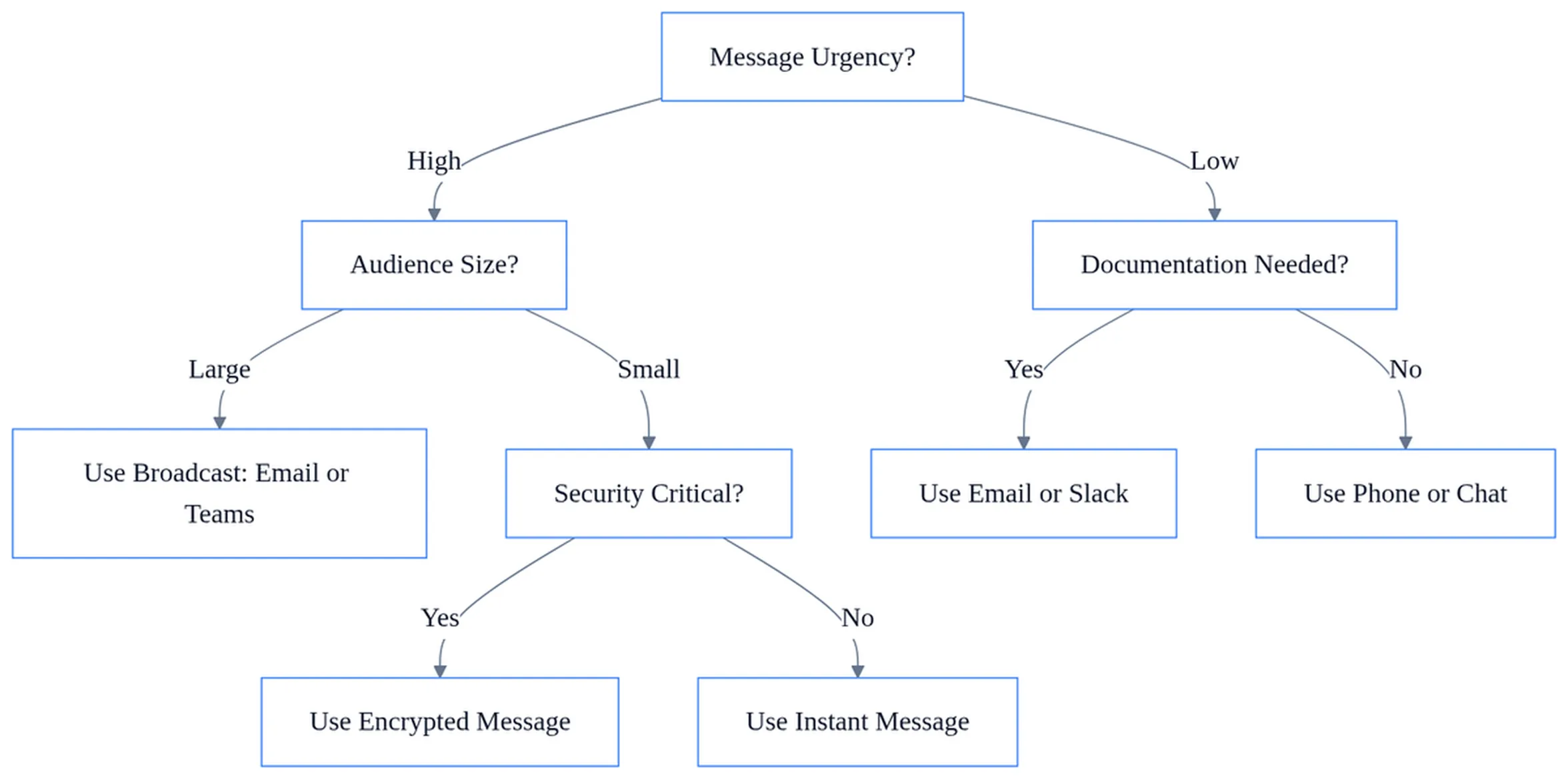
Encryption and authentication form the foundation of secure digital communication. End-to-end encryption ensures only intended recipients can read messages, while multi-factor authentication prevents unauthorized account access. A financial services firm that implements these measures reduces breach risk, but also introduces friction. Employees complain about extra login steps, and encrypted files can’t be searched as easily.
Compliance requirements add complexity. GDPR mandates specific data handling practices for European customer information, healthcare organizations must follow HIPAA rules for patient communication, and financial institutions face SEC recordkeeping requirements. Technology must enable compliance, not just communication. This means choosing platforms with audit trails, data retention controls, and geographic data residency options.
Balancing transparency with confidentiality is harder in digital environments. A Slack channel that promotes open collaboration also creates a searchable record of every offhand comment. What feels like a casual conversation becomes discoverable in litigation. Smart organizations establish clear guidelines about which types of business communication belong in which channels, reserving sensitive discussions for encrypted platforms with appropriate retention policies.
Communication overload and technology fatigue
Information overload is technology’s hidden cost. The average knowledge worker receives 120 emails daily, monitors three messaging platforms, and gets notifications from project management tools, calendar apps, and CRM systems. Each interruption fragments attention. Research published in Harvard Business Review found that workers take an average of 23 minutes to fully refocus after an interruption, meaning constant notifications effectively destroy deep work.
Always-on culture erodes work-life boundaries.
When your work email lives on your phone and colleagues expect responses within an hour regardless of time zones, evenings and weekends disappear. A manager who checks Slack at 10 PM signals to her team that after-hours availability is expected, creating burnout risk that undermines the productivity gains technology promised.
Reduced face-to-face interaction weakens relationship-building. Video calls capture words and facial expressions but miss the hallway conversations where trust develops and informal knowledge transfers. A new employee who onboards entirely remotely might execute tasks competently but struggle to know who to ask for help or how decisions really get made. The problems of electronic communication often surface in these relationship gaps that technology alone can’t bridge.
Intentional communication norms help manage overload. Teams that designate “focus time” blocks when notifications are muted, establish response-time expectations by channel (Slack: 2 hours, email: 24 hours, project comments: 48 hours), and hold “no-meeting Thursdays” reclaim control from technology’s default always-available mode. The tools themselves are neutral; discipline in how you use them determines whether they serve or enslave.
Technology adoption barriers and change management
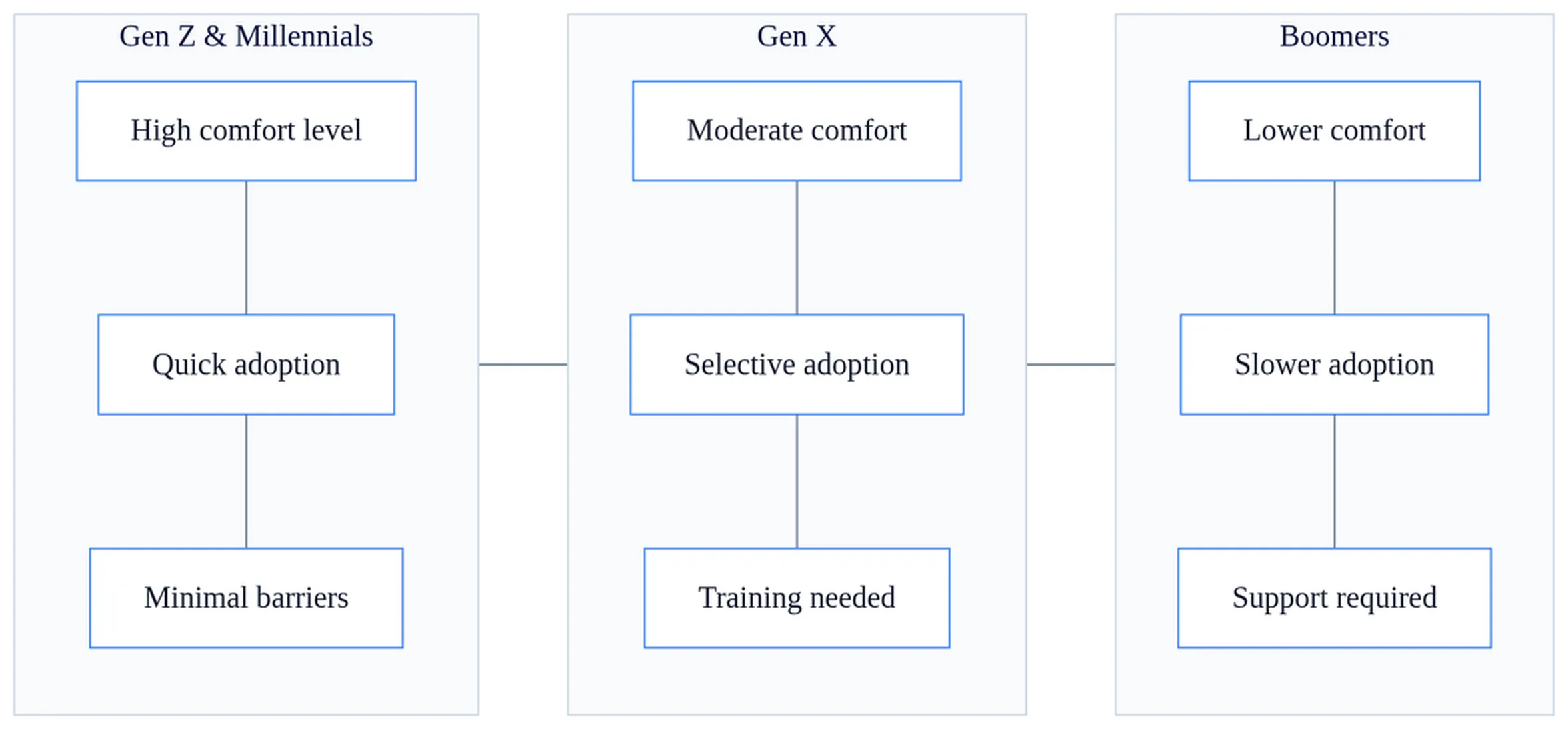
Generational differences in technology comfort create friction during adoption. A 25-year-old marketing coordinator who grew up with smartphones adapts to a new collaboration platform in days. Her 58-year-old colleague in finance, who learned email in his thirties, faces a steeper learning curve and may resist change simply because the old system worked fine for his workflow.
Learning curves impose real costs. Training employees on new platforms requires time away from productive work. A company rolling out Microsoft Teams to 500 employees might budget 4 hours of training per person, 2,000 hours of lost productivity before the new system delivers any benefits. Multiply that by average hourly wages, and the soft costs of adoption often exceed licensing fees.
Resistance to change often reflects legitimate concerns, not mere stubbornness. An experienced salesperson who resists adopting a new CRM might worry that documenting every client interaction in a shared system exposes her relationships to poaching by colleagues or makes her replaceable. Addressing these barriers to effective communication requires acknowledging fears and building trust, not just better training materials.
Integration challenges compound adoption friction. Legacy systems rarely play nicely with modern platforms. A manufacturer using a 15-year-old ERP system discovers that the shiny new project management tool can’t pull inventory data automatically, forcing double-entry that negates efficiency gains. Successful technology adoption requires either costly integration work or acceptance that some manual processes will persist.
| Adoption Challenge | Common Symptom | Practical Response |
|---|---|---|
| Generational comfort gaps | Older employees avoid new platform, continue using email for everything | Pair tech-comfortable employees with those struggling; create role-specific quick-start guides |
| Learning curve anxiety | Low initial usage despite training; requests to delay rollout | Phase rollout by department; celebrate early wins publicly; offer ongoing drop-in support sessions |
| Cultural resistance | Passive non-compliance; continued use of old tools “just for now” | Identify respected informal leaders as champions; address specific concerns rather than mandate compliance |
| Integration failures | Duplicate data entry; important information lives in disconnected systems | Invest in API connections or middleware; accept that some manual bridges are necessary during transition |
Best practices for technology-enabled communication
Choosing the right tool starts with understanding the communication’s purpose. Synchronous tools work best for collaborative problem-solving, brainstorming, or conversations where tone and immediate feedback matter. Asynchronous tools suit information distribution, documentation, or communication across time zones where immediate response isn’t needed.
A common mistake is defaulting to meetings because video calling is easy. A 30-minute video call with six people consumes three person-hours. If the agenda is purely informational, a 400-word email that takes 2 minutes to read saves 2 hours and 48 minutes of collective time. The advantages of electronic communication multiply when you match the medium to the message.
Clear communication norms prevent chaos. Document which channels serve which purposes: Slack for quick questions needing answers within hours, email for formal requests requiring documentation, project management tools for task assignments, video calls for complex discussions. When everyone knows where to look for what, information overload decreases.
Maintaining human connection alongside digital efficiency requires intentionality. A fully remote team might schedule monthly in-person gatherings or weekly video “coffee chats” with no agenda beyond relationship-building. A hybrid team might reserve Tuesdays and Thursdays as in-office days when collaborative work happens face-to-face, leaving Monday, Wednesday, and Friday for focused remote work.
Regular evaluation prevents technology sprawl. Every six months, audit which tools your team actually uses versus which ones clutter the app drawer. If the project management platform you licensed for 50 users shows only 12 active accounts, either invest in adoption or cancel the subscription. If three different messaging apps fragment conversations, standardize on one. According to SHRM research, the average organization uses 8-12 different communication tools, far more than necessary, creating confusion about where information lives.
Technology serves communication; it doesn’t replace the thinking that makes communication work. A poorly written email arrives instantly but still fails to persuade. A video call with unclear objectives wastes everyone’s time despite the convenience of not traveling. The most sophisticated collaboration platform can’t fix a team that hasn’t agreed on goals or decision-making authority. Focus on communication fundamentals first, then choose technology that amplifies what already works.
Speed, cost savings, and global reach are real advantages. Security risks, information overload, and adoption challenges are equally real. Success comes from choosing appropriate tools, establishing clear norms, and remembering that effective communication ultimately depends on clarity and respect for the people on the other end of the channel, not the sophistication of the platform delivering your message.
Frequently asked questions
If asynchronous communication is faster, why do some teams still schedule synchronous meetings?
Asynchronous tools speed up information sharing, but synchronous meetings serve different purposes: building relationships, making complex decisions requiring debate, and resolving conflicts. A product roadmap discussion benefits from real-time back-and-forth. A status update doesn’t. The trap is defaulting to meetings when asynchronous communication would suffice. Choose based on whether the conversation needs immediate interaction or just information transfer.
What happens when remote teams rely too heavily on speed and skip thorough decision-making?
Speed becomes a liability when teams rush decisions based on incomplete data simply because tools allow instant responses. Faster communication doesn’t guarantee better outcomes. Set explicit decision-making timelines that allow for review and input, even if the technology could deliver responses instantly. The challenge is knowing when to slow down despite having the capability to move quickly.
How do you prevent version control chaos when multiple people edit shared documents simultaneously?
Real-time collaboration tools like Google Docs or Microsoft 365 eliminate the “Final_v3_ACTUAL_USE_THIS” problem by showing all edits in one document with change tracking and comment threads. Establish clear ownership: designate one person as document owner, set edit permissions by role, and use version history to revert mistakes. This prevents the productivity loss of managing dozens of conflicting file copies.
Should you still use formal written communication if instant messaging platforms are available?
Context matters. Use instant messaging for quick clarifications and coordination. Use formal written communication (email, documented memos) for decisions, policies, compliance records, and anything you might need to reference later. Instant messages disappear from context; formal records remain searchable and auditable. Mix both based on the message’s importance and permanence needs.
What’s the biggest risk when centralizing all business information in digital systems?
Dependency on system availability and cybersecurity. If your knowledge base, email, or file storage goes down, communication halts. If breached, sensitive data is exposed at scale. Mitigate by maintaining backups, enforcing access controls, training staff on security, and having offline contingency plans. The same centralization that democratizes information access also concentrates risk.