


Multimedia communication combines text, audio, video, animation, graphics, and interactive elements into a unified digital experience. This article explains what multimedia communication is, breaks down its core components, and shows how industries from healthcare to education apply it to solve real problems. You’ll also learn the cognitive science behind why multimedia improves retention and the practical design principles that separate effective multimedia from cluttered noise.
What is multimedia communication?
Multimedia communication integrates multiple forms of media into a single system to convey information. Unlike traditional single-channel communication that relies on one medium (a printed memo, a radio broadcast, or a static image), multimedia uses the strengths of each format simultaneously.
This approach mirrors how humans naturally process information. You don’t learn only by reading or only by listening. You combine spoken explanations with visual demonstrations, written instructions with hands-on practice. Multimedia communication formalizes this multi-sensory approach in digital environments, creating richer, more accessible experiences than any single medium can deliver alone.
The defining characteristic is integration.
A PowerPoint slide deck with bullet points is not multimedia. But when you embed a video demonstration, add voiceover narration, and include clickable links to supplementary resources, you’ve created a multimedia experience. The components work together, each reinforcing the others to communicate more effectively than they would in isolation.
Core components of multimedia
Every multimedia system draws from six foundational elements. Understanding each helps you design better communication tools and recognize when to use which combination.
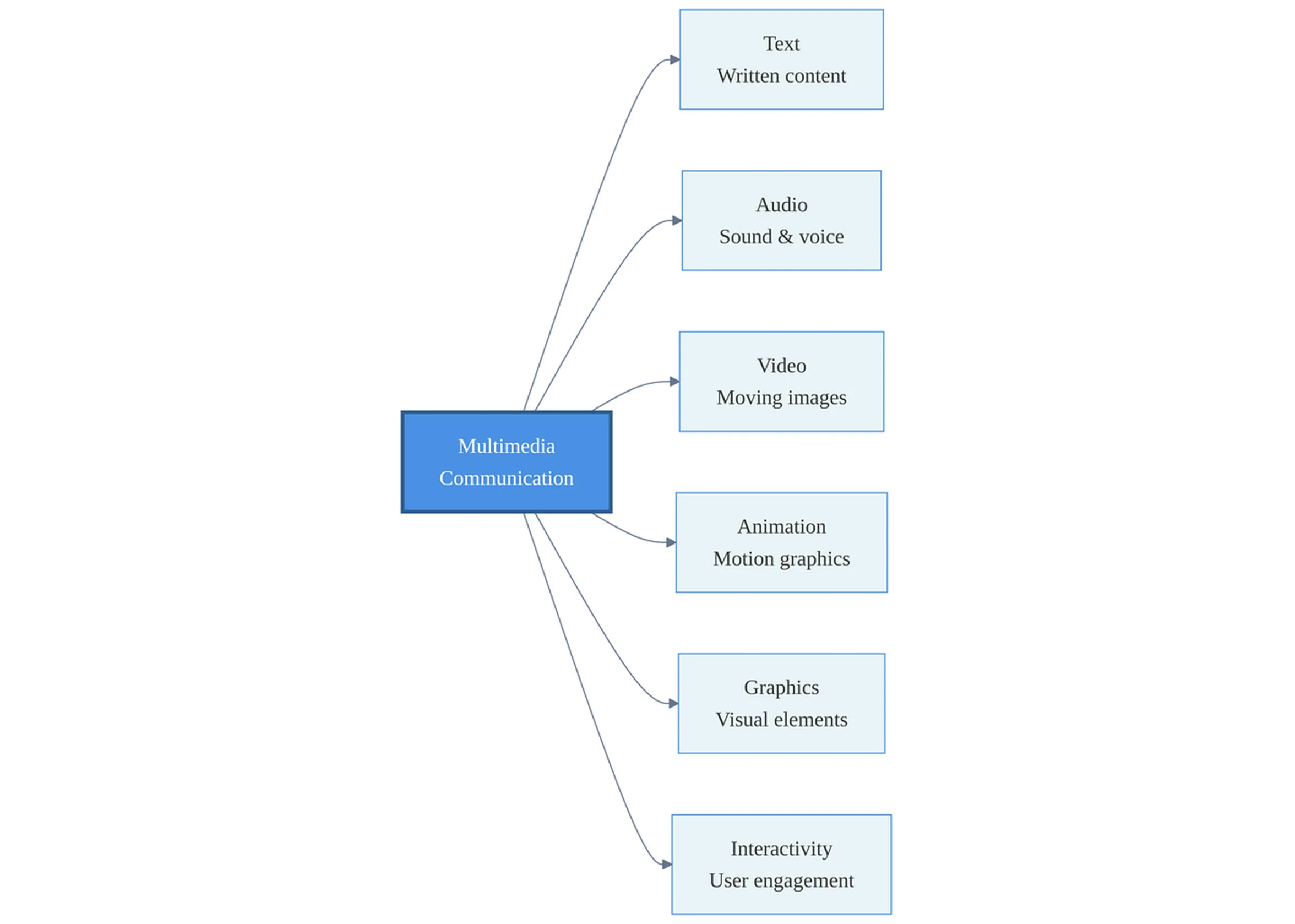
Text remains the backbone of most multimedia. It includes written content, typography choices, and layout decisions that affect readability. Text provides structure, labels, and detailed explanations that other media can’t easily convey. A well-designed caption or annotation can make a complex diagram instantly understandable.
Audio encompasses voice narration, music, sound effects, and ambient noise. Audio adds emotional tone and pacing that text alone can’t achieve. A 60-second voiceover explaining a process often communicates more efficiently than a 500-word written description. Podcasts, webinars, and audiobooks all use audio’s unique strengths.
Video captures motion, facial expressions, and real-world demonstrations. It’s particularly effective for showing procedures, telling stories, and building emotional connection. A three-minute video of a surgical technique conveys information that would require dozens of static images and paragraphs of text to approximate.
Animation brings abstract concepts to life. Where video records reality, animation constructs it. You can show how blood flows through the heart, how a supply chain moves goods across continents, or how a software algorithm makes decisions, concepts that are invisible or too complex to film directly.
Graphics include static images, infographics, diagrams, charts, and illustrations. They organize information spatially, making relationships and hierarchies visible at a glance. A well-designed infographic can communicate data patterns that would take pages of text to describe.
Interactivity gives users control over their experience. Hyperlinks let readers choose their own path through content. Clickable hotspots on an image reveal additional detail. Interactive simulations let learners experiment with variables and see results in real time. This element transforms passive consumption into active exploration, which dramatically improves both engagement and retention.
Why multimedia improves communication and learning
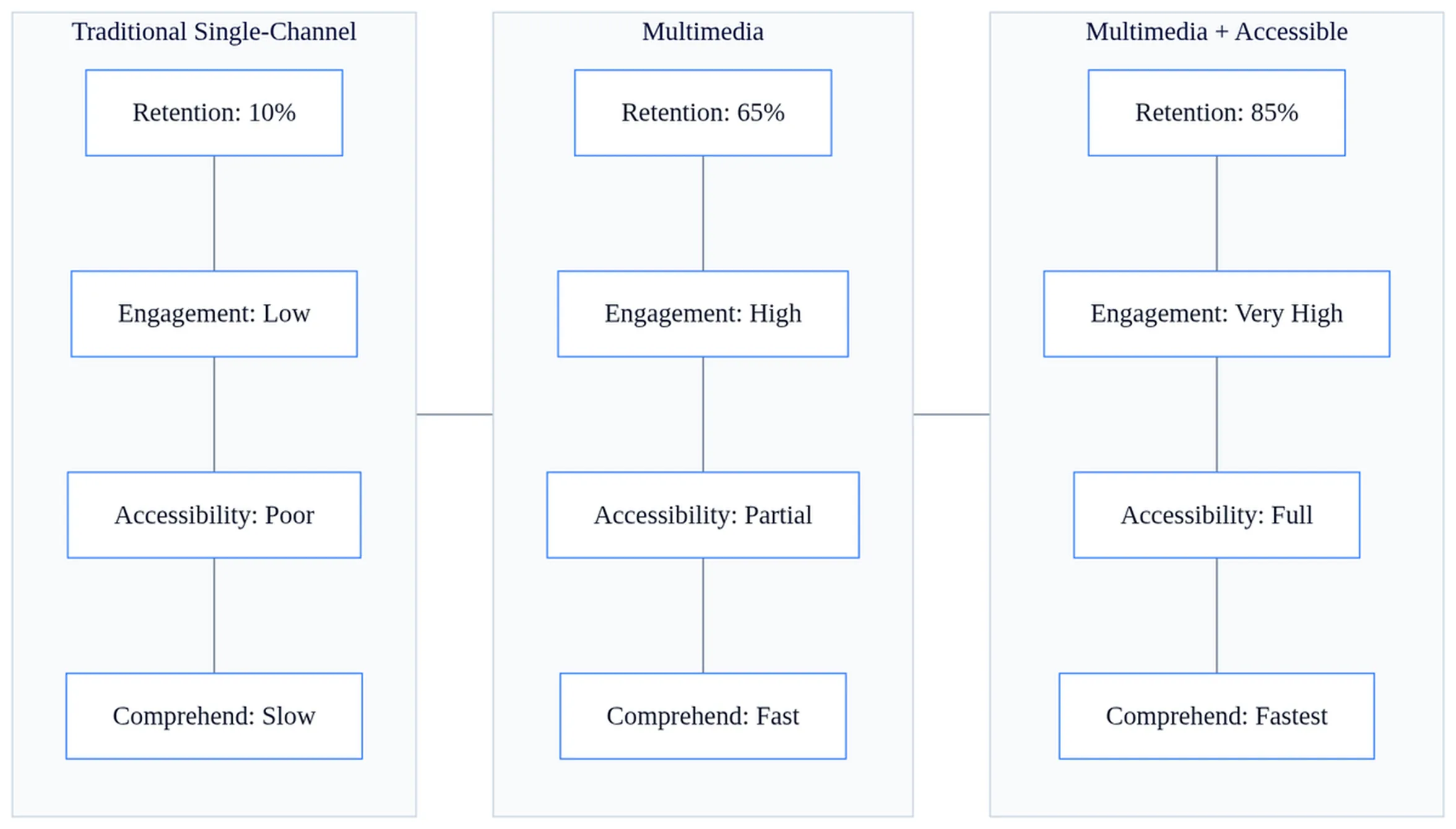
Multimedia works because of how your brain processes information. Cognitive scientist Richard Mayer’s Multimedia Learning Theory explains that humans have separate channels for processing visual and auditory information. When you present related information through both channels simultaneously (say, an animation with synchronized narration), learners can process more total information without overload.
This dual-coding effect increases retention. A study participant who watches an animated explanation of how bicycle pumps work while hearing a narration will remember and apply that knowledge better than someone who only reads the text or only watches silent animation. The visual and verbal information reinforce each other, creating multiple memory pathways.
Multimedia also holds attention longer than single-channel communication. A 2,000-word article demands sustained focus. Break that same content into a two-minute video, three infographics, and 500 words of supporting text, and you’ve created multiple entry points that accommodate different learning preferences and attention spans.
Accessibility benefits emerge when you design multimedia with redundancy. Captions make video content accessible to deaf users, but they also help anyone in a noisy environment or watching without sound. Alt text descriptions of images serve blind users while also improving search engine optimization. This principle of multi-sensory redundancy (presenting the same information through multiple channels) serves diverse audiences without requiring separate versions.
Multimedia excels at making abstract concepts concrete. Try explaining cloud computing architecture with text alone, and you’ll produce paragraphs of dense technical writing. Add a diagram showing data flow between servers, clients, and storage systems, and comprehension jumps. Animate that diagram to show how data moves during a typical transaction, and suddenly the abstract becomes tangible.
Multimedia in education and e-learning
Educational institutions and corporate training programs have widely adopted multimedia because it delivers measurable improvements in learning outcomes. Interactive course content (video lectures, animated tutorials, and simulations) consistently outperforms traditional text-only materials in completion rates and assessment scores.
A Dhaka-based software training academy shifted from PDF-based courses to multimedia modules combining screen-capture videos, interactive coding exercises, and animated concept explanations. Their course completion rate increased from 43% to 78%, and students reported higher confidence applying skills in real projects.
Remote and hybrid learning depends on multimedia. Asynchronous courses let students learn at their own pace, rewatching difficult sections and skipping content they already understand. A recorded lecture with embedded quizzes, supplementary reading links, and downloadable slides creates a self-contained learning environment that doesn’t require real-time instruction.
Accessibility features in educational multimedia aren’t optional. They’re legally required in many jurisdictions and pedagogically essential everywhere. Captions benefit not just deaf students but also non-native speakers, students in noisy environments, and anyone who processes written information more easily than spoken. Transcripts let students search for specific topics within a lecture. Alt text on diagrams ensures blind students receive equivalent information through screen readers.
Multimedia in healthcare and medical training
Healthcare applications of multimedia deliver some of the most dramatic real-world results. Surgical simulation using 3D anatomical models and virtual reality reduces procedure time and error rates. A 2002 study found that surgical residents who trained with VR simulations completed laparoscopic procedures 29% faster and were six times less likely to make errors than residents trained with traditional methods alone (source).
Telemedicine relies heavily on video conferencing and multimedia diagnostics to extend care to remote patients. A physician can review a patient’s medical history, examine uploaded photos of a skin condition, discuss symptoms over video, and prescribe treatment, all without an in-person visit. This multimedia approach makes specialized care accessible to rural communities that lack local specialists.
Medical education has moved beyond textbook diagrams to animated physiology, interactive 3D anatomy models, and recorded case studies. A cardiology student can rotate a beating heart model, zoom into valve structures, and watch blood flow animations, experiences impossible with static images. These tools don’t replace hands-on training, but they accelerate the foundational knowledge that makes clinical practice more effective.
Patient communication improves when healthcare providers use visual communication tools. A surgeon explaining a procedure with an animated video and annotated diagrams helps patients understand risks, benefits, and recovery expectations better than verbal explanation alone. Informed consent becomes truly informed when patients can visualize what will happen.
Multimedia in business, marketing, and communication
Marketing campaigns increasingly rely on multimedia to drive engagement and conversion. A product landing page with embedded video demonstrations, interactive 360-degree product views, and customer testimonial clips converts visitors at higher rates than text-and-static-image pages. The multimedia approach answers questions, builds trust, and creates emotional connection simultaneously.
Business presentations gain persuasiveness when presenters move beyond bullet-point slides. Embed a customer testimonial video. Show an animated comparison of your solution versus competitors. Include an interactive dashboard that lets stakeholders explore data in real time. These multimedia elements make abstract claims concrete and memorable.
Internal business communication benefits from multimedia too. A CEO video message accompanied by an infographic summarizing key points and a written transcript ensures every employee receives the information in their preferred format. Quarterly results presented through an interactive dashboard let managers drill into departmental performance without sitting through a 50-slide deck.
Brand storytelling through multimedia creates emotional connection that text alone can’t match. A nonprofit documenting its impact might combine beneficiary video interviews, animated data visualizations showing program reach, and written case studies. Each medium contributes something unique: video delivers emotional authenticity, animation clarifies complex data, and text provides depth and detail.
The role of technology in business communication continues expanding as multimedia tools become more accessible and bandwidth constraints diminish. What required a production team and specialized equipment five years ago now happens on smartphones with free software.
Emerging multimedia technologies: VR and AR
Virtual Reality (VR) creates fully immersive, computer-simulated environments that replace your view of the physical world. Put on a VR headset, and you’re transported to a training simulation, a virtual meeting room, or a reconstructed historical site. VR excels in scenarios where real-world practice is dangerous, expensive, or impossible: pilot training, combat simulation, surgical rehearsal, and hazardous materials handling.
Augmented Reality (AR) overlays digital content onto your view of the real world. Point your smartphone at a piece of furniture in a store, and AR shows how it would look in your living room. AR applications range from navigation (arrows projected onto your windshield) to maintenance (repair instructions overlaid on broken equipment) to education (anatomical structures superimposed on a physical model).
Practical applications continue expanding. Airlines use VR to train flight attendants on emergency procedures without grounding aircraft. Architecture firms let clients walk through buildings before construction begins. Museums offer AR-enhanced exhibits where pointing your phone at an artifact reveals its history, construction process, and cultural context.
These immersive technologies must balance engagement with cognitive load. VR sickness affects some users. Information-dense AR overlays can overwhelm rather than clarify. Effective immersive multimedia follows the same principles as traditional multimedia: use technology to enhance understanding, not to impress with technical capability.
Best practices for effective multimedia communication
Balance media types carefully. More isn’t always better. A training module that combines video, animation, interactive quizzes, background music, and narration might seem comprehensive, but it can overwhelm learners. Use multimedia to clarify, not to decorate. Each element should serve a specific purpose.
Synchronize audio and video precisely. When narration describes “the red component in the upper left,” that component should be highlighted at that exact moment. Mismatched timing between what viewers hear and what they see creates confusion and cognitive load. Professional multimedia authoring tools include timeline editors specifically for this synchronization.
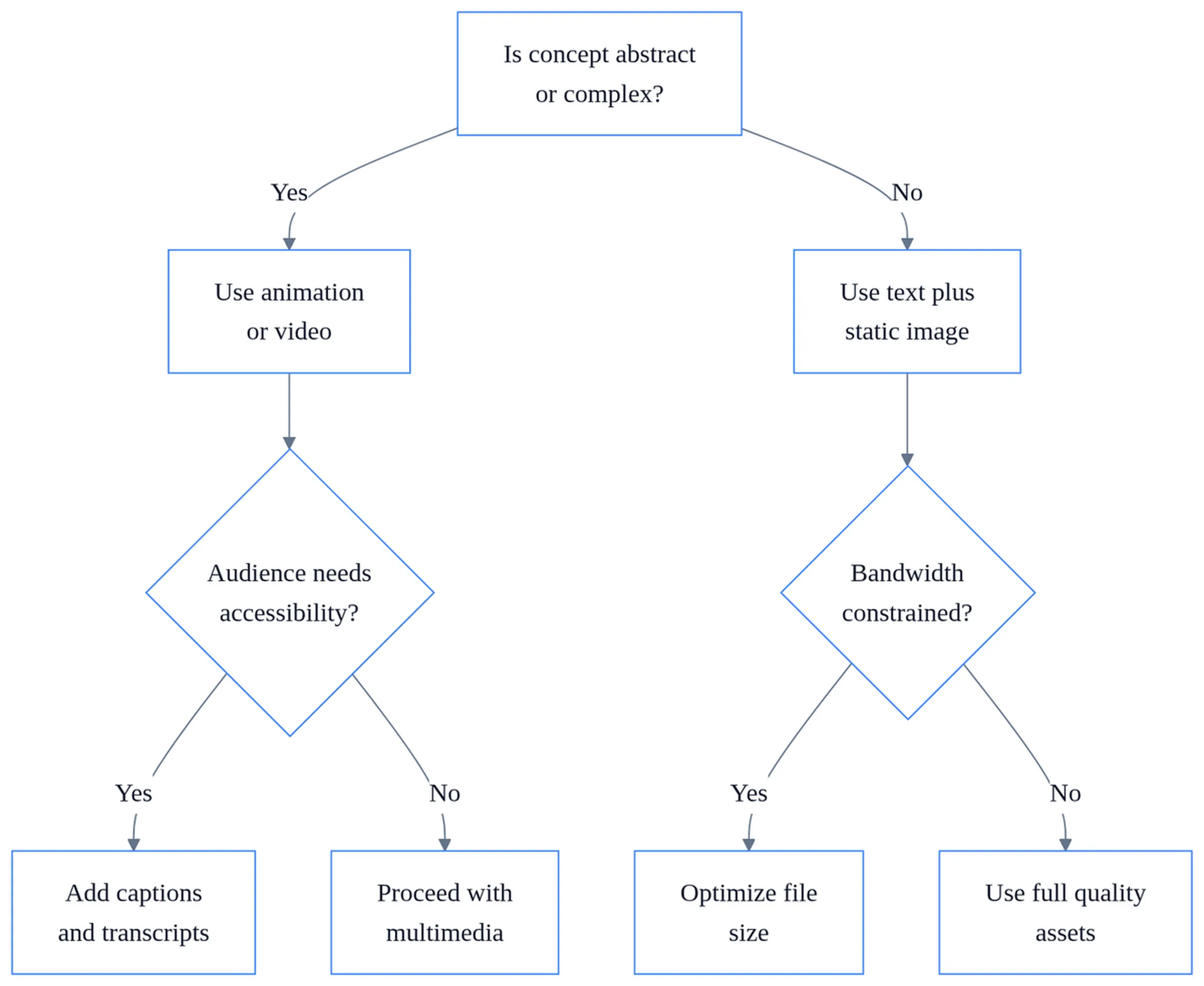
Design for accessibility from the start, not as an afterthought. Follow Web Content Accessibility Guidelines (WCAG): include captions for all video content, transcripts for audio, alt text for meaningful images, and keyboard navigation for interactive elements. These features benefit everyone, not just users with disabilities.
| Design Element | Purpose | Common Mistake |
|---|---|---|
| Captions | Make audio content accessible; aid comprehension in noisy environments | Auto-generated captions with errors left uncorrected |
| Alt Text | Describe images for screen readers; provide context when images fail to load | Generic descriptions like “image” or “photo” instead of specific content |
| Transcripts | Allow searching within audio/video content; provide alternative format for users who prefer reading | Omitting transcripts entirely or placing them where users can’t find them |
| Color Contrast | Ensure text remains readable for users with visual impairments | Low-contrast text over background images that looks stylish but unreadable |
Test with actual users before deployment. What seems clear to you as the creator may confuse your audience. Watch someone use your multimedia content without guidance. Where do they get stuck? What do they skip? What do they rewatch? This feedback reveals whether your multimedia enhances understanding or just adds complexity.
Consider bandwidth and device compatibility. A 4K video with spatial audio might look stunning on your desktop, but it won’t load on a smartphone with a weak cellular connection. Provide multiple quality options when possible, and optimize file sizes without sacrificing essential clarity. Users accessing content from rural areas or developing regions face real connectivity constraints.
What most people get wrong: they assume multimedia always improves communication. It doesn’t. A simple text explanation sometimes outperforms an elaborate multimedia production. If your audience needs to reference specific details repeatedly, text is more scannable than video. If they’re experts who don’t need visual scaffolding, adding animations wastes their time. Match the medium to the message and the audience, not to what’s technically possible.
Multimedia communication works best when each component plays to its strengths. Text provides detail and permanence. Audio adds tone and pacing. Video captures reality and emotion. Animation clarifies the invisible. Graphics organize information spatially. Interactivity enables exploration. When you combine these elements thoughtfully, you create communication that’s more accessible, more memorable, and more effective than any single medium alone.
Frequently asked questions
Should I use video or animation to explain a complex process?
Use video when showing real-world procedures, actual people, or existing systems—like a surgical technique or customer service interaction. Choose animation when the concept is invisible, too small, or too fast to film—like molecular movement or data flowing through servers. Animation also works better for abstract ideas that don’t exist in physical form. Often, combining both is most effective.
What happens if I add multimedia without a clear purpose?
Cluttered multimedia confuses rather than clarifies. Every element—video, graphic, sound—should reinforce your core message. A decorative animation or background music that doesn’t relate to your content distracts learners and wastes cognitive resources. Before adding any element, ask: does this help the audience understand or remember the message better?
How do I make multimedia accessible without creating separate versions?
Build accessibility into your original design. Add captions to all videos (helps deaf users and noisy environments). Write descriptive alt text for images (serves blind users and improves SEO). Provide transcripts for audio content. Use sufficient color contrast and readable fonts. This redundancy approach serves diverse audiences with one version, not multiple.
Can I use multimedia in formal business communication like reports?
Yes, but strategically. Embed charts and infographics to present data more clearly than tables. Use short video summaries for executive overviews. Add interactive PDFs with clickable navigation. Avoid animation or music that feels unprofessional. The goal is clarity and efficiency, not entertainment. Multimedia in formal settings should look intentional, not decorative.
Why does a narrated animation work better than silent video with text?
Your brain processes visual and auditory information through separate channels. When narration and animation are synchronized, you can absorb more information without cognitive overload—a principle called dual-coding. Silent video forces you to read text while watching, creating competition for visual attention. Narration frees your eyes to focus on the animation itself.