


Video conferencing is real-time audio-visual communication between participants in different geographic locations, enabled by cameras, microphones, internet connectivity, and specialized software. This article explains how video conferencing works technically, what bandwidth and latency you need for quality calls, the distinct meeting types your organization will encounter, and the security and compliance requirements that matter in healthcare, education, and finance.
What is video conferencing?
Video conferencing allows two or more people to see and hear each other simultaneously while located in different places. Unlike a casual video chat with friends, business video conferencing typically involves structured agendas, screen sharing, recording capabilities, and integration with calendar and collaboration tools.
The core requirement is straightforward: each participant needs a camera, a microphone, a display, and an internet connection. Software platforms like Zoom, Microsoft Teams, Google Meet, or Webex handle the transmission, compression, and synchronization of audio and video streams. Hardware can range from a laptop’s built-in webcam to dedicated room systems with multiple cameras, professional microphones, and large displays.
Video conferencing preserves much of what makes face-to-face communication effective: you observe facial expressions, gestures, and tone of voice. This visual feedback accelerates the communication process compared to email or voice-only calls, especially when resolving complex issues or building trust with new clients.
How video conferencing works: Technical basics
When you speak into a microphone during a video call, analog sound waves are converted into digital data by a codec, a compression algorithm that shrinks file size without destroying quality. The same happens to the video stream from your camera. These digital packets travel over IP networks (your office internet or a mobile data connection) to a server, which routes them to other participants, where they’re decompressed and played back on screens and speakers.

Bandwidth determines how much data can flow per second. For standard-definition video, you need around 1 Mbps upload and download. HD quality requires 1.5 to 2 Mbps, and 4K streams demand 3 Mbps or more. According to the International Telecommunication Union, modern codecs like H.264 and VP9 achieve high compression ratios, making HD video practical even on modest connections.
Latency, the delay between speaking and the other person hearing you, must stay below 150 milliseconds for natural conversation flow. Higher latency causes awkward pauses and people talking over each other. Echo cancellation and noise suppression technologies filter out background sounds and prevent your microphone from picking up audio from your own speakers, which would create feedback loops.
Most platforms handle these technical details automatically. You press “Join Meeting” and the software negotiates the best codec, adjusts bandwidth usage based on network conditions, and applies audio filters without requiring manual configuration.
Types of video conferencing meetings
Not all video calls are alike. The meeting type determines which platform features matter and what equipment you need.
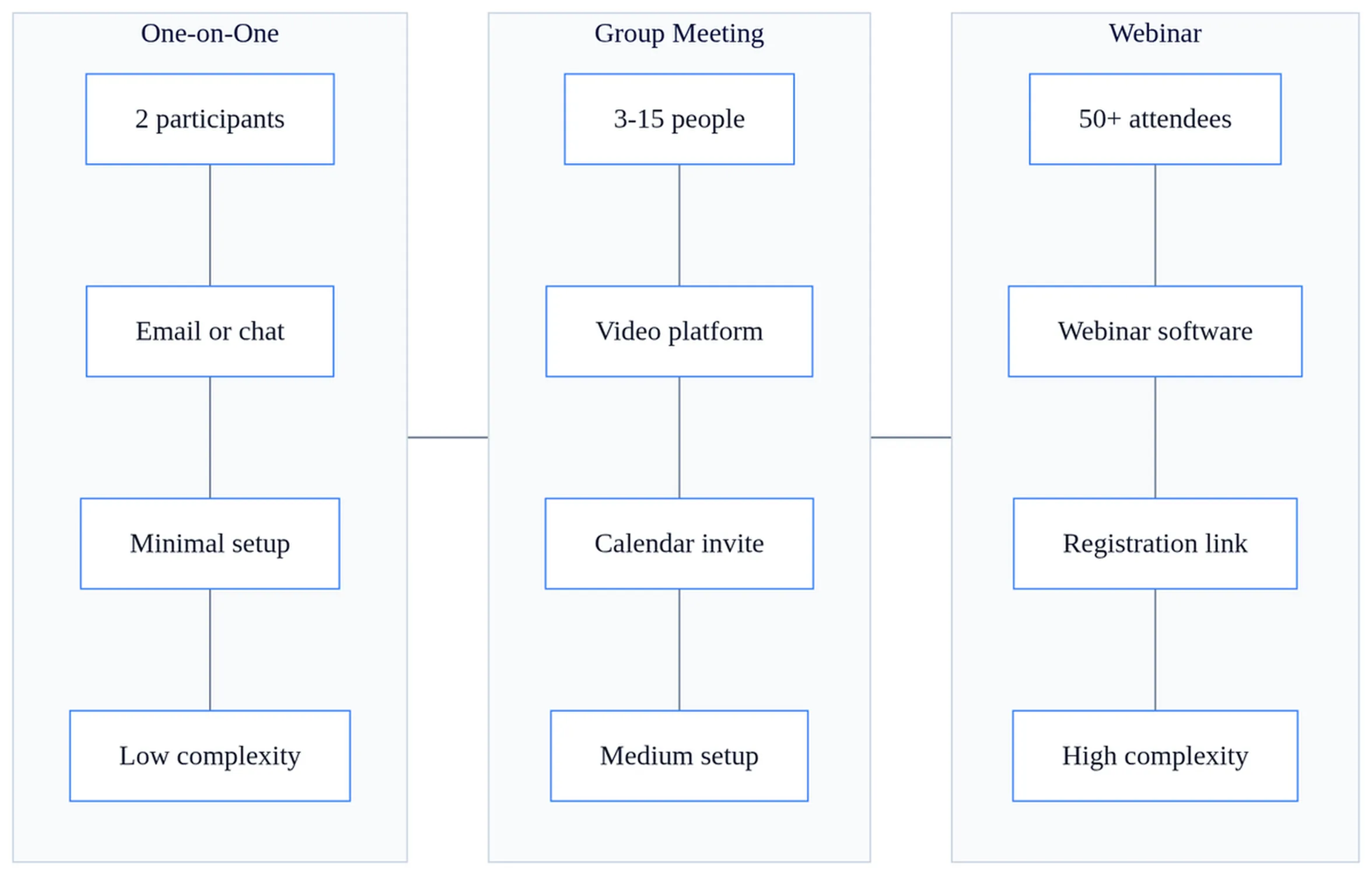
| Meeting Type | Participant Count | Primary Use Cases | Technical Requirements |
|---|---|---|---|
| One-on-one | 2 | Client consultations, performance reviews, mentoring | Basic webcam and headset; peer-to-peer connection delivers highest quality |
| Group meetings | 3-20 | Team standups, project reviews, departmental updates | Meeting platform (Teams, Zoom, Meet); screen sharing; recording capability |
| Webinars | 100+ | Product launches, training sessions, town halls | Presenter-focused layout; Q&A moderation; limited participant video to preserve bandwidth |
| Hybrid meetings | Varies | Board meetings, workshops with both in-room and remote attendees | Room system with wide-angle camera, ceiling microphone array, large display; careful audio placement to avoid echo |
One-on-one calls are the simplest. Both participants get full-screen video of each other, and the connection is often peer-to-peer, bypassing a central server. Group meetings require a platform that can mix multiple video streams, manage speaker transitions, and handle screen sharing. Webinars prioritize one-way broadcasting with limited interactivity.
Hybrid meetings are the most technically demanding. A small Dhaka-based agency with three people in a conference room and four remote participants needs a camera that captures everyone in the room, microphones that pick up voices evenly, and a display large enough for remote participants to see in-room body language. Poor hybrid setup makes remote attendees feel like second-class participants, and they’ll disengage within the first ten minutes.
Key benefits of video conferencing for business
The primary driver for adopting video conferencing is cost reduction. A multinational with offices in Dhaka and Singapore might spend $2,000 per executive for a two-day trip: airfare, hotel, meals, and lost productivity during travel. A 90-minute video call costs nothing beyond the platform subscription you already pay. For companies with frequent cross-border collaboration, the savings compound quickly.
Travel time savings matter even more than money. A regional manager who previously spent eight hours flying to visit a branch office can now conduct weekly check-ins without leaving her desk. This frequency enables faster decision-making. Problems get flagged and resolved before they escalate.
Visual communication preserves nonverbal cues that email and phone calls lose. You see a client’s hesitation when you propose a price, or a team member’s confusion when you explain a new process. These micro-expressions guide you to clarify, negotiate, or pivot in real time. The role of technology in business communication has expanded precisely because video bridges the gap between text-based tools and in-person interaction.
Environmental impact is increasingly relevant. According to research from the University of Manchester, replacing business travel with video conferencing could reduce global CO2 emissions by 54 million tons annually. Organizations with sustainability commitments cite this as a measurable benefit when justifying remote-first policies.
Geographically dispersed teams can now synchronize daily without friction. A software development team with engineers in three time zones holds a 15-minute standup each morning to review progress. Before video conferencing became ubiquitous, such coordination required asynchronous tools like email or Slack, which introduced delays and misunderstandings.
Limitations and challenges
Technology dependency is a real constraint. A network outage, a software crash, or a hardware failure can halt a critical client presentation. While platforms have become more reliable, you still need a backup plan: a phone dial-in number, a rescheduled meeting, or a pre-recorded presentation you can send if the call fails.
Initial setup costs are substantial for organizations that want professional-quality systems. A conference room system with a 4K camera, a soundbar, and a 65-inch display costs $3,000 to $8,000. Enterprise deployments with SIP integration, multiple cameras, and IT support require capital investment that small businesses struggle to justify.
User fatigue is a documented phenomenon. Stanford researchers found that prolonged video calls cause cognitive load because your brain processes multiple faces simultaneously while also monitoring your own image on screen. People report exhaustion after back-to-back video meetings in ways they don’t experience with phone calls or in-person conversations. “Zoom fatigue” has entered the business vocabulary as shorthand for this challenge. Most teams over-rely on video when a quick phone call would resolve the issue faster, and this creates unnecessary cognitive drain that compounds across a week of meetings.
Security and privacy risks increase when sensitive conversations move online. Unencrypted calls can be intercepted. Unauthorized participants can join if meeting links are shared carelessly. Recordings stored on unsecured servers create data breach vulnerabilities. According to the Society for Human Resource Management, organizations must implement access controls, encryption, and audit logging to mitigate these risks.
The digital divide creates unequal participation. An executive with a high-speed fiber connection and a $200 webcam experiences crisp video and clear audio. A field technician joining from a rural area on a 3G mobile hotspot sees pixelated video, hears choppy audio, and frequently drops from the call.
Security and compliance considerations
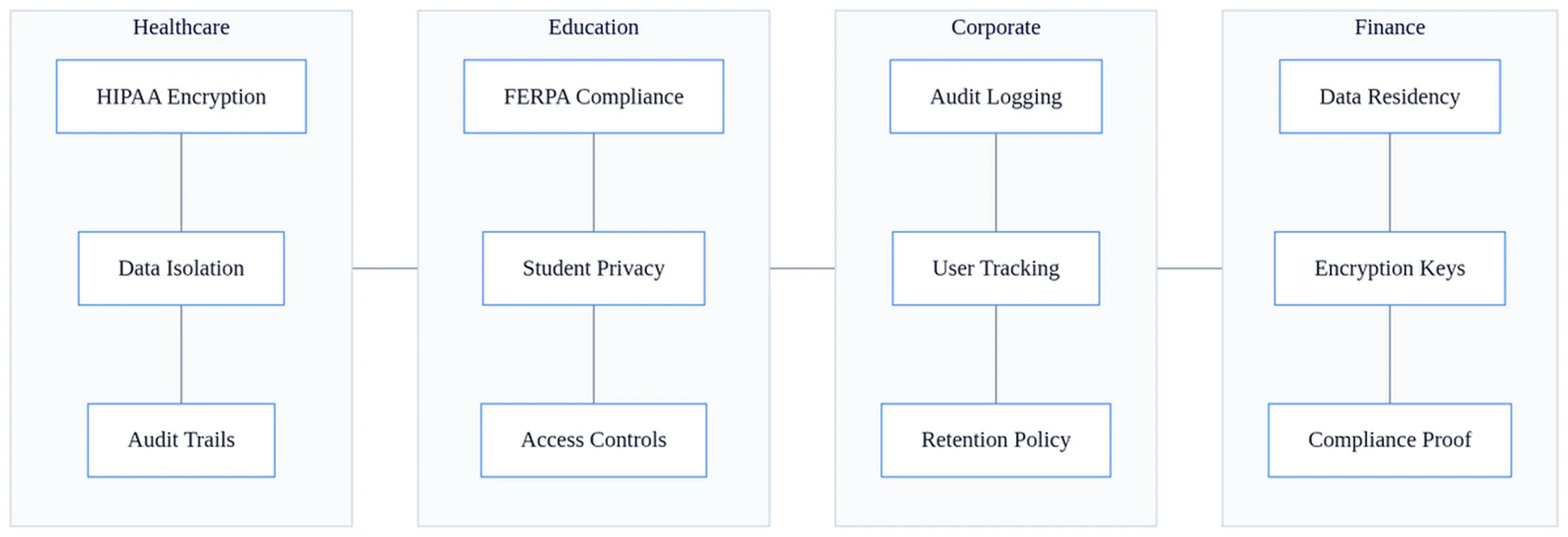
Healthcare organizations conducting telemedicine consultations must comply with HIPAA regulations in the United States. This requires end-to-end encryption, Business Associate Agreements with platform vendors, and audit logs that track who accessed patient data. Platforms like Zoom for Healthcare and Doxy.me are specifically configured to meet these requirements. According to HIPAA Journal, using a consumer-grade video platform for patient consultations without a BAA exposes providers to significant fines.
Educational institutions must protect student data under FERPA in the US and similar regulations in other countries. Recording lectures that include student faces or voices requires consent. Platforms must allow administrators to control who can record, download, or share meeting content.
Finance and legal sectors demand encrypted, audit-logged systems for confidential discussions. A law firm conducting a deposition via video needs to ensure the recording is tamper-proof and that only authorized parties can access it. GDPR compliance in the European Union requires data residency controls: video data from EU participants must be stored on servers within the EU, not transmitted to data centers in other regions.
Most platform vendors offer compliance-specific configurations, but you must enable them. Default settings prioritize ease of use over security. Your IT team needs to configure waiting rooms, passcodes, and encryption before the first client call.
Video conferencing use cases across industries
Corporate teams use video conferencing for client meetings, team standups, board presentations, and onboarding. A sales team scattered across three cities holds a weekly pipeline review where each rep shares their screen to walk through deals in progress. New hires complete orientation remotely, watching recorded training videos and joining live Q&A sessions with HR.
Healthcare providers conduct telemedicine consultations, remote patient assessments, and specialist collaborations. A general practitioner in a rural clinic connects with a cardiologist in a teaching hospital to review an ECG. Visual assessment matters: the specialist can observe the patient’s color, breathing, and mobility, not just read lab results.
Educational institutions deliver lectures, office hours, PhD vivas, and distance learning programs. A university in Dhaka offers a master’s degree to working professionals who join evening classes remotely. Recorded lectures allow students to review complex topics at their own pace.
Events and conferences have shifted to hybrid formats. A tech conference hosts 200 in-person attendees and 2,000 remote participants who watch keynotes via livestream and join breakout sessions in virtual rooms. Networking happens in dedicated video chat lounges where attendees can drop in and out of conversations.
Choosing the right setup for your needs
A basic setup (laptop webcam, USB microphone, and a stable internet connection) suffices for one-on-one calls and small group meetings. Invest $50 in a decent microphone and $80 in a 1080p webcam, and you’ll outperform most participants using built-in laptop hardware.
An intermediate setup for a team meeting room includes a dedicated camera with a wide-angle lens to capture everyone seated around a table, a soundbar or speakerphone that picks up voices evenly, and a large display so remote participants appear life-sized. This costs $1,500 to $3,000 and transforms a generic conference room into a hybrid-ready space.
Enterprise deployments integrate video systems with your PBX, allow one-touch meeting joins from room panels, and provide IT support for troubleshooting. Multiple cameras track active speakers automatically. Professional audio systems eliminate echo and background noise. These systems cost $10,000 or more per room but deliver a consistent experience across dozens of locations.
Platform selection matters as much as hardware. Standardize on one vendor to reduce user friction. If your organization uses Microsoft 365, Teams integrates with Outlook calendars and SharePoint files. If you frequently host webinars for external audiences, Zoom’s webinar features and participant capacity may justify a separate subscription. Avoid the temptation to support five different platforms: your users will struggle to remember which link opens which app. For practical guidance on running effective remote sessions, see our guide on virtual meetings best practices.
Video conferencing has moved from a luxury for large enterprises to a standard business tool. You eliminate travel costs, preserve visual communication, and enable geographically dispersed teams to collaborate in real time. The trade-offs (technology dependency, setup costs, and user fatigue) are manageable with the right equipment, platform configuration, and meeting discipline. For healthcare, education, and finance, compliance and security requirements add complexity, but vendors now offer purpose-built solutions. If you’re debating whether to invest in a professional room system, the answer usually depends on how often you host hybrid meetings with external stakeholders: twice a month or more, and the investment pays for itself in credibility alone.
Frequently asked questions
Should I use a room system or laptop camera for hybrid meetings?
Use a dedicated room system if remote participants outnumber in-room attendees or if the meeting involves complex discussions. Room systems have wide-angle cameras and ceiling microphone arrays that capture everyone evenly and prevent remote participants from feeling excluded. A laptop camera works only if you have one or two people in the room and they sit close to the screen.
What should I do if my internet connection keeps dropping during calls?
First, check your upload and download speeds—you need at least 1 Mbps for standard video. If speeds are adequate, move closer to your router, close bandwidth-heavy applications, or switch to a wired Ethernet connection. If problems persist, contact your ISP. As a temporary fix, disable video and use audio-only to preserve call quality.
Is it acceptable to join a video call without video if I’m not camera-ready?
For one-on-one client calls or formal meetings, turn on video—it builds trust and shows respect. For internal team standups or large webinars where you’re not presenting, audio-only is acceptable. Always check the meeting norms in your organization. If unsure, ask the organizer beforehand rather than joining without video unexpectedly.
Why do people talk over each other on my video calls?
High latency (delay over 150 milliseconds) causes overlapping speech because participants don’t hear each other in real time. Check your internet connection and ask participants to mute when not speaking. If latency is the issue, switch to a platform or network with lower delay, or reduce video quality to free up bandwidth for faster audio transmission.
Can I record a video call without telling participants?
No. Recording laws vary by location, but most jurisdictions require all-party consent—everyone on the call must know and agree to being recorded. Many platforms now display a notification when recording starts. Always disclose recording at the meeting start and get explicit permission, especially for client calls or sensitive discussions.
What’s the difference between a webinar and a group video meeting?
Webinars are broadcast-style with one or few presenters and many passive viewers (100+). Participants typically can’t see each other’s video, only the presenter. Group meetings are interactive with 3-20 participants who can all see and speak. Choose webinars for training or product launches; use group meetings for collaboration and discussion.